
I am not sure what are current solutions for drawing commutative diagrams. Currently, I draw it in quiver, and then export the LaTeX code to TeXmacs, and rendered via Quiver python plugin. This is not optimal, especially concerning exportation to LaTeX, which requires some manual works.
Commutative diagrams
The plugin XYpic is made for that:
Insert -> Session -> XYpic
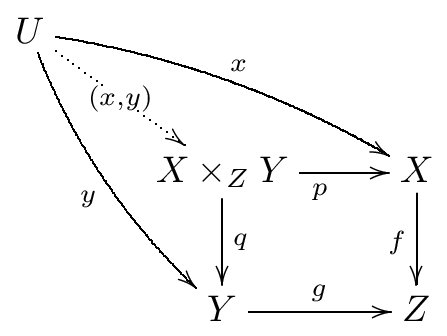
Example of using XYpic inside TeXmacs:
XYpic] \xymatrix{
         U \ar@/_/[ddr]_y \ar@/^/[drr]^x \ar@{.>}[dr]|-{(x,y)} \\
         & X \times_Z Y \ar[d]^q \ar[r]_p & X \ar[d]_f \\
         & Y \ar[r]^g & Z}
The XYpic homepage is:
http://www.tug.org/applications/Xy-pic/
Nicolas
It is the same as Quiver plugin (or even worse — Quiver produces TikZ which has much more customizations than XYpic). The issue is that, when you export this to LaTeX, it will become embedded PDFs, instead of LaTeX codes being embedded. A major issue of this is that, preprint websites such as arXiv would reject such kind of submissions.
An old post on Quiver plugin: Quiver plugin for GNU TeXmacs
I don’t see any other solution than rewriting or customizing one of the plugins to fit your needs. I wrote the first version of the XYpic plugins 22 years ago (2004), may be Xy-pic is now an outdated program…
My current workaround is to envelope these plugin codes into <specific|texmacs|>, and add another piece of <specific|latex|> to embed the tikz-cd part into the LaTeX conversion. However, the rendering in TeXmacs is bad in this case. For example, it is not effective to include anything like padded-center into <specific|texmacs|>, and thus the image produced by the plugin could only be left-aligned.