It seems that every time you insert \footnote it will create a new one. Is there a way to refer to the previously created footnote?
Thanks in advance if anyone knows!

It seems that every time you insert \footnote it will create a new one. Is there a way to refer to the previously created footnote?
Thanks in advance if anyone knows!
In a test I did, it was possible by putting a label inside the footnote, then referring to that label. TeXmacs generated a label automatically too (footnote-1), but I added a footnote before the one I wanted to refer to and the automatically generated label got associated to the first footnote in the text, not the first footnote I wrote.
ah, thank you for your reply! sorry for not seeing it earlier. do you mind elaborating how to put a label inside the footnote? can you show an example? thank you so much 
To enter a label for a footnote, you place the cursor inside the footnote (e.g. at the beginning of the footnote) switch to hybrid mode by pressing \, then write label and press Return. For the hybrid mode see the TeXmacs manual at https://www.texmacs.org/tmweb/documents/manuals/texmacs-manual.en.pdf, section 2.8.3
Once you have done that, you will see that you get automatically the place where to write the label’s name; then write it (for example footnote:example, where in place of example you may write something that reminds you of the footnote’s content) and you can use it in a reference.
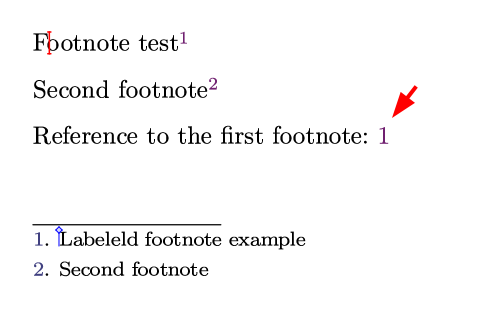
I paste here a document which contains two footnotes, the first of which has a label and is referenced after a second footnote. Copy everything in an empty text document, rename it with the extension .tm and let TeXmacs open it; pls. let me know if you need more details.
<TeXmacs|2.1.4>

<style|generic>

<\body>
  Footnote test<\footnote>
    <label|footnote:example>Labeleld footnote example
  </footnote>

  Second footnote<\footnote>
    Second footnote
  </footnote>

  Reference to the first footnote: <reference|footnote:example>

  \;
</body>

<\initial>
  <\collection>
    <associate|page-medium|paper>
    <associate|preamble|false>
  </collection>
</initial>

<\references>
  <\collection>
    <associate|footnote-1|<tuple|1|1|2014-footnote-tables.tm>>
    <associate|footnote-2|<tuple|2|?|2014-footnote-tables.tm>>
    <associate|footnote:example|<tuple|1|?|2014-footnote-tables.tm>>
    <associate|footnr-1|<tuple|1|1|2014-footnote-tables.tm>>
    <associate|footnr-2|<tuple|2|?|2014-footnote-tables.tm>>
  </collection>
</references>
Thank you so much! It works.
It worked, yes, thank you too. Any idea how to make the footnote reference format in the same way as a “real” footnote?
Currently, it does not look like a footnote:
Hi @smartmic and welcome to the forum.
I would try copying the formatting from the footnote definition. If you need instructions on how to do so, please let me know.
Hi @pireddag, thank you for your quick response and your welcoming words. As I am very new to TeXmacs, it would indeed help me if you could quickly explain how I can copy a formatting from one tag/object (?) to another. I tried to find my way around it but failed so far …
I had not thought it through so I have to give you an approximated formatting, that might need to be corrected for your text settings
<very-small|<move|<reference|footnote-1>||0.635t>>
I wrote “copy format”, but I did not mean that (sorry  ); in my answer I meant figuring out the format and replicating it. The way to find the code of a macro is to use the macro editor. There is a post on this in the TeXmacs blog, at https://texmacs.github.io/notes/docs/macro-editor.html. It might be enough to read the beginning up to the reference to Figure 5 (with caption “The todo macro in source mode inside the Macro editor.”)
My previous answer takes for granted that the code that places the footnote number in the text can be found by examining the code of the footnote macro in that way but I did not find the code there, it might be C++ code. I have then guessed how to format the reference to the footnote.
Please let me know if all of this makes sense.
Hi @pireddag, yes, it makes sense and, even better, it worked  - thank you!
The only thing was, I could not open a macro editor for the reference tag (the wrench inside the tag gave me only “Locus color” and “Visited color”), but I managed to change it in source code mode.