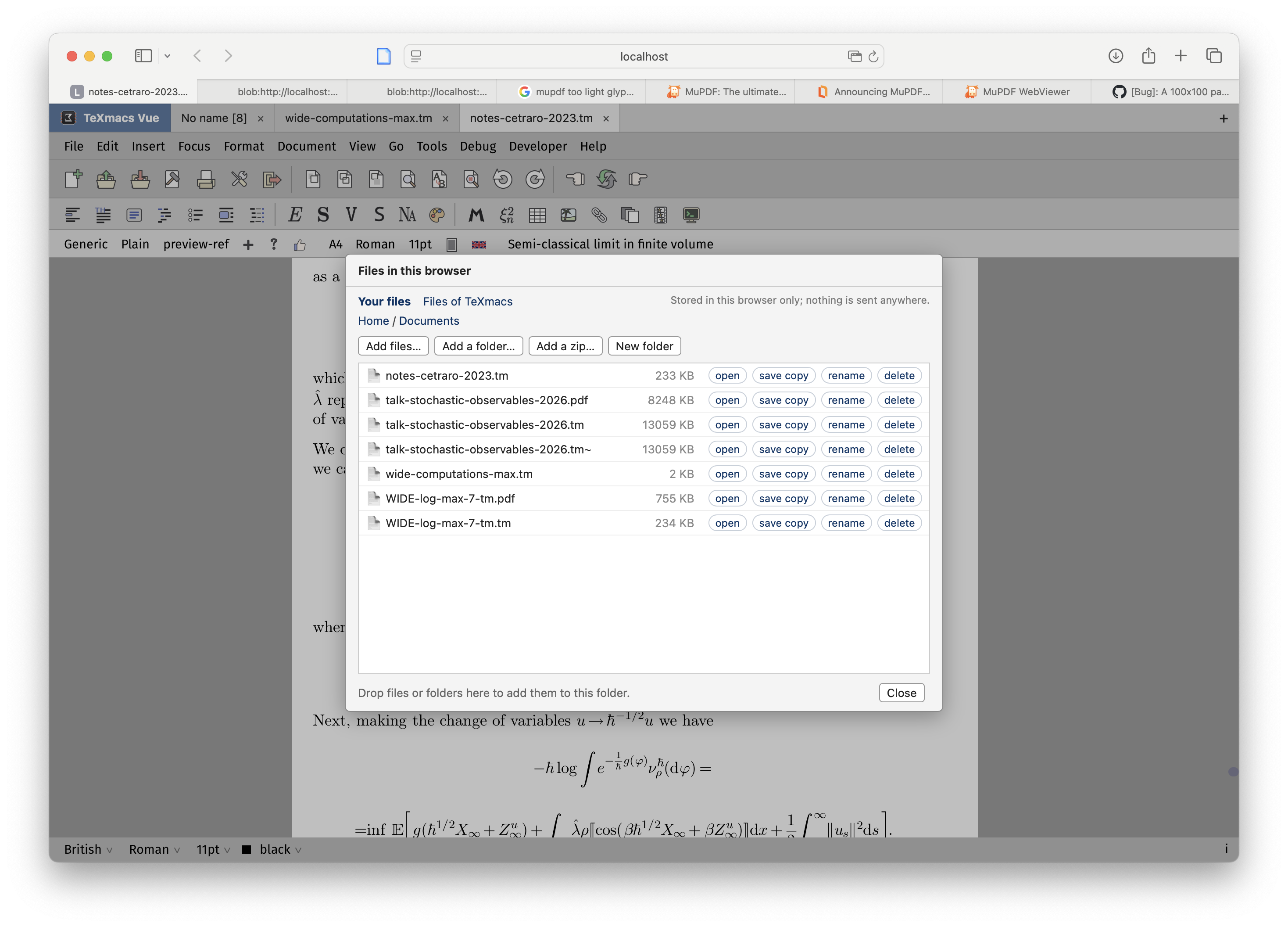
You can try it here: https://github.com/mgubi/texmacs/tree/wip_wasm_vue
please use issues to report problems, thanks!
Max

You can try it here: https://github.com/mgubi/texmacs/tree/wip_wasm_vue
please use issues to report problems, thanks!
Max
very cool. I’m new to texmacs and seeing this is gold.
On Safari this worked: alt+left or alt+right for switching the cursor between words or alt+tab for cycling between modes. On LibreWolf not.
This worked across both browsers:
Shift+enter for executing code worked for me.
Using the ^ button on mac didn’t work for me, likely due to it waiting for a second input source before passing it on. Maybe a different way to handle keyboard input might be required.
Pasting between sessions removes metadata, but works inside the same session.
Otherwise it’s very powerful. it even survives look-and-feel settings during page reloads, runs scheme too.
If this saves files in your browser’s temporary storage, then I think the “download a copy” option when saving is misleading since there is no downloading going on. Your files are always stored locally.
I think it needs to be clear in the UI that this is saving to the browser’s temporary storage and maybe the option should say “save permanently” instead of “download a copy”.
I’m not sure to understand. If you check “download a copy” and click save then two things happen: the first is that the file is saved in the browser internal storage (which survives if you quit the browser) and also download a copy in your “Download” folder (like a regular browser download), so that the file is available to you in your local file system. I tried now and works for me.
I would need some more information to reproduce the problem with the ^, which keyboard are you using?
For the other problem unfortunately the browser intercept a lot of key combinations, and I cannot do much for it. You need to change the combination in TeXmacs if this is important to you.
The word “download” will make people think that their files will be stored on a remote server with all the privacy worries that that implies.
Yes I see your point. I’m not sure which expression would fit better. Save permanently is also ambiguous since the files are already permanent, they persist across sessions. Maybe “export”?
How do you know they persist across sessions? Isn’t that an option that the user can change in their web browser?
There are two major problems with the UI:
I modified the interface and clarified that the files are not uploaded to a server. Thanks for the feedback.
BTW, sometimes typing is really fast and sometimes it is really slow. This happens on Safari under macOS 27.0.1 on an m3 MacBook Pro. Do you know why?
it’s macOS, though with a swiss-CH keyboard.
Hi, and thanks for the detailed report, which was very helpful. All three problems should now be fixed in the online version at https://mgubi.github.io/texmacs/.
Alt+arrows and Alt+Tab in LibreWolf. LibreWolf turns on Firefox’s anti-fingerprinting protection by default. When it’s on, the browser doesn’t send the events for pressing or releasing modifier keys (Alt/Option, Ctrl, Cmd, Shift), which TeXmacs relied on. So Option+Left reached TeXmacs as a plain Left. TeXmacs now reads which modifiers are held from each key press and click. Safari wasn’t affected because it sends those events normally.
The ^ dead key (and other accents). In the browser, TeXmacs draws everything on a single canvas, and the browser only combines keys into accented letters inside a text field. So the dead key on your Swiss keyboard was lost. Keys now go through a hidden text field, so these should work:
While you’re composing, the letters appear at the cursor in the document, and the system’s popup should appear next to the cursor.
Copying and pasting between pages. Paste now keeps the structure (math, tables and so on) between two tabs or windows running TeXmacs, and after a reload. A copy now carries the TeXmacs version of the selection along with the HTML. Pasting into other programs still gives plain text or HTML as before.
One caveat: If something still doesn’t work, especially a dead key followed by a particular letter, please tell me the browser, the keys you pressed, what you expected and what you got.
All of these changes are also listed under Help → TeXmacs in the browser → “Recent changes”.
Thanks again!
I couldn’t reproduce it on an M-series Mac with Safari, where typing stays at 60 frames per second, so it must depend on something particular to your setup. Some questions that would help:
If you can, open the editor at https://mgubi.github.io/texmacs/texmacs.html?profile=120, work until it gets slow, then send me the last lines printed in the console (Develop → Show JavaScript Console). Every 120 frames they show where the time goes: layout, typesetting, drawing, and so on. Close the console while you type, then reopen it to copy the lines.
I just tried it now and it is fast on battery power.
Maybe it’s only slow when it has to load lots of data on startup (e.g., because there’s an update)? Maybe that causes a speed penalty later when typing?
Some measurements of the browser version (current state, 5 October 2026)
I compared TeXmacs Vue in the browser (WebAssembly) with the desktop build of the same program, compiled natively. Setup: Apple M1, headless Firefox, the page served locally (so network time is not included), a test document of 100 sections of text and displayed formulas (about 25 pages).
Download. Before the program can start, the browser fetches about 9.5 MB: the program (22.8 MB, 5.5 MB with brotli) and the boot package of TeXmacs’s files (3.9 MB). The rest of the files (about 12 MB more, 22 MB in all) follow in the background, and fonts are loaded when a document needs them. On later visits everything comes from the browser’s cache.
Start (from the page being loaded to TeXmacs running):
Editing (CPU time of the work, idle time excluded):
| browser | desktop (native) | |
|---|---|---|
| typesetting the 25-page document | 0.44 s | 0.32 s |
| typing, per key | ≈ 17 ms | ≈ 15 ms |
| 30 × Page Down | 0.56 s | 0.74 s |
Typing, scrolling and typesetting are about as fast as the desktop program; scrolling is even a bit faster, because the browser version draws with WebGL.
What is slower: Scheme. S7 runs 2 to 2.5 times slower in WebAssembly (a pure Scheme benchmark: 119 ms vs 48 ms; converting the test document to LaTeX: 0.30 s vs 0.17 s). It shows in commands which are mostly Scheme, and at the start.
What changed today: the files of TeXmacs were given the time of each visit, so at every start TeXmacs believed they had all changed. It merged its font database again, and that discarded the caches filled during the start; it also never trusted its directory caches (about 22,000 file checks at each start). The files now have one fixed time per build. Scheme initialization went from 310 ms to 77 ms (native: 60 ms), and the start of later visits from 1.5 s to 1.0 s.
If you want to measure on your machine, add to the address of the page:
?debug=bench prints the steps of the start in the browser console;?profile=60 prints, every 60 frames, where the time of each frame goes.The page: http://github.com/mgubi/texmacs/
It’s consistently fast now. I’ll let you know if it slows down again.