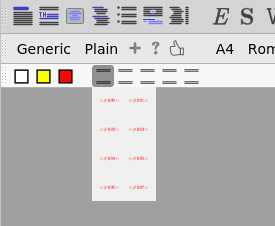
Thanks for the report and the test code, it made this easy to track down.
You’re right that two different mechanisms are involved. When TeXmacs draws a character in a document, it uses fonts that can fall back to other fonts when a character is missing, so practically any Unicode character shows up. The symbols in menus and icon palettes are drawn by a simpler routine that only uses one classic TeX font. That font knows the symbols TeXmacs has names for, like <alpha>, <leq> or <rightarrow>, and these are the only ones the built-in palettes use. It doesn’t know other Unicode characters, so <#100> and friends come out as the red “unknown character” text.
So it’s not a mistake in your code, just a limitation of how menu symbols are drawn. We’re changing that routine to use the same fonts as the editor, so menu symbols will behave like characters in the document. It’s tracked here: https://github.com/mgubi/texmacs/issues/254
In the meantime, you could try ordinary menu entries with the character as the label instead of symbol, for example:
(menu-bind unicode-Latin-Extended-A
  ("<#100>" (insert "<#100>")) ("<#101>" (insert "<#101>"))
  ("<#102>" (insert "<#102>")) ("<#103>" (insert "<#103>")))
Labels are drawn by the interface toolkit, which should handle these characters. They may look slightly different from the symbol buttons, since they use the interface font rather than the document font.