
@xuyiqi1 
both approaches seem to be indeed a very good way to visually reorganize contents
Is there a nicer way to reorganize slides?
For long documents you could try the outline plugin by @pjoyez
https://github.com/texmacs/tm-forge/tree/main/miscellanea/outline
2 Likes
I had another look at the source code, and there is already some functionality there: see clipboard-cut and clipboard-paste in TeXmacs/progs/dynamic/fold-edit.scm.
You can cut slides in paper and panorama modes by making a selection that spans multiple slides and cutting to the clipboard. You can then put the cursor elsewhere and paste. The slides will be inserted before the current slide.
It is far from an ideal solution, as you can only cut multiple slides, and you can only paste before the current slide, which is inconvenient if you want to move a slide to the very end. You can, of course, insert some empty slides and remove them later.
Be mindful of bug 62498 when you want to use this, though:
https://savannah.gnu.org/bugs/?62498
I imagine that this code could be fairly easily adapted to add a button on the toolbar that moves the current slide up or down.
1 Like
I’ve written a small plugin to add the ability to move slides up and down. After installing the plugin, two icons should appear in the focus bar when in paper or panorama view. It moves one slide at a time at the moment.
4 Likes
Fantastic. Thank you very much!
1 Like
I copied the folder into my ~/.TeXmacs/plugins/ directory, restarted texmacs but did not see the icons. I even updated the plugins from the tools menu. Still nothing. Is there anything else I need to do?
Could you please try to switch back and forth between screens and paper modes? The above-mentioned bug could be messing up your file.
If that doesn’t help, please check the output of tree ~/.TeXmacs/plugins/slidemove. It should look similar to this
/home/jeroen/.TeXmacs/plugins/slidemove
├── misc
│   └── pixmaps
│       ├── tm_slide_move_down.png
│       ├── tm_slide_move_down.svg
│       ├── tm_slide_move_up.png
│       └── tm_slide_move_up.svg
├── progs
│   ├── init-slidemove.scm
│   └── slidemove.scm
├── README.md
└── screenshot.pngThe directory structure is the same. I have other plugins installed (like pygments) and they all show. For some reason, this one doesn’t.
Could you please try to insert a Scheme session into a document and enter (supports-slidemove?) into it?
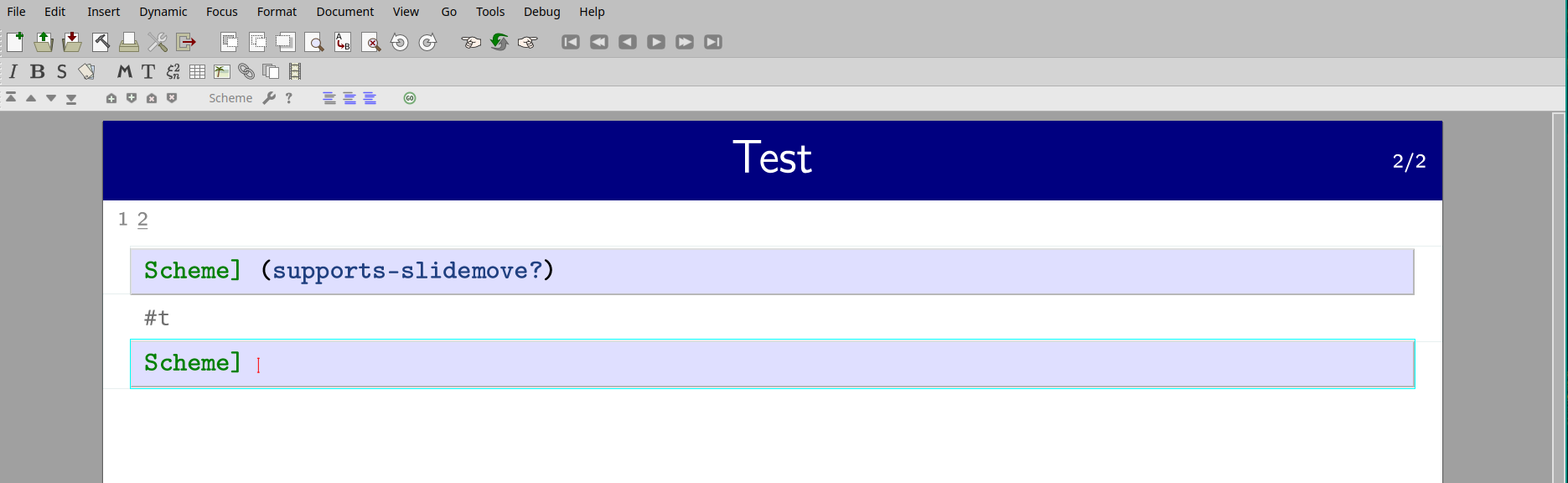
Which page layout are you using? Go to Document -> Page… and make sure Page rendering is either Paper or Panorama.
Or use this modified slidemove.scm:
;;;;;;;;;;;;;;;;;;;;;;;;;;;;;;;;;;;;;;;;;;;;;;;;;;;;;;;;;;;;;;;;;;;;;;;;;;;;;;
;;
;; MODULE      : slidemove.scm
;; DESCRIPTION : Move slides in a beamer presentation
;; COPYRIGHT   : (C) 2022 Jeroen Wouters
;;
;; This software falls under the GNU general public license version 3 or later.
;; It comes WITHOUT ANY WARRANTY WHATSOEVER. For details, see the file LICENSE
;; in the root directory or <http://www.gnu.org/licenses/gpl-3.0.html>.
;;
;;;;;;;;;;;;;;;;;;;;;;;;;;;;;;;;;;;;;;;;;;;;;;;;;;;;;;;;;;;;;;;;;;;;;;;;;;;;;;;

(texmacs-module (slidemove))

; (tm-define (nr-slides)
;   (:require (inside? 'slideshow))
;   (with-innermost s 'slide
;     (length (tree-children (tree-ref s :up)))))

(define (slidemove-swap-down s)
    (if (tree-ref s :next)
      (let* ((p (tree->path s)) ;; path to the current slide
             (i (last p)) ;; index of the slide
             (t (tree-ref s :up))) ;; parent node of the slide
        ;; insert a copy of slide i after its successor
        (tree-insert t (+ i 2) (list (tree->stree s)))
        ;; remove original slide
        (tree-remove t i 1)
        (tree-go-to t (+ i 1) 0))))


(define (slidemove-swap-up s)
    (if (tree-ref s :previous)
      (let* ((p (tree->path s)) ;; path to the current slide
             (i (last p)) ;; index of the slide
             (t (tree-ref s :up))) ;; parent node of the slide
        ;; insert a copy of slide i before its predecessor
        (tree-insert t (- i 1) (list (tree->stree s)))
        ;; remove original slide, now at i+1
        (tree-remove t (+ i 1) 1)
        (tree-go-to t (- i 1) 0))))


(tm-define (move-slide-up)
  (noop))

(tm-define (move-slide-up)
  (:require (inside? 'screens))
  (with-innermost s 'shown (slidemove-swap-up s)))

(tm-define (move-slide-up)
  (:require (inside? 'slideshow))
  (with-innermost s 'slide (slidemove-swap-up s)))

(tm-define (move-slide-down)
  (noop))

(tm-define (move-slide-down)
  (:require (inside? 'screens))
  (with-innermost s 'shown (slidemove-swap-down s)))

(tm-define (move-slide-down)
  (:require (inside? 'slideshow))
  (with-innermost s 'slide (slidemove-swap-down s)))


(tm-menu (standard-focus-icons t)
    (:require (or (screens-context? t) (slideshow-context? t)))
    (former t)
    ---
    ((balloon (icon "tm_slide_move_up.png") "Move slide up") (move-slide-up))
    ((balloon (icon "tm_slide_move_down.png") "Move slide down") (move-slide-down))
    )
2 Likes
slidemove is now a built-in plugin in Mogan Research v1.2.5.1.
And I have removed many other unstable plugins.
2 Likes
Hello, I would like to test the slidemove pluggin, but I did not succeed in installing it. I downloaded the folder from github here : https://github.com/texmacs/tm-forge/tree/main/miscellanea/slidemove, I copied it within the plugin folder of my local texmacs initialization folder (".TeXmacs/plugins/") and I restarted texmacs, but the package does not seem to load.
Many thanks in advance for your help!
Hi @lclaire38 and welcome to the forum.
Please try to
- set the document in Beamer style (from the menu Document -> Style -> Beamer)
and following that - set the document in
papermode (from the menu Focus -> Slideshow -> Paper)
(you may need to switch between screens and paper mode, this says the post http://forum.texmacs.cn/t/is-there-a-nicer-way-to-reorganize-slides/868/12 in this thread)
The plugin is loaded if the two “slidemove” buttons appear in the ribbon.
This thread might help as well:
Hi @pireddag, thank you for the swift answer. I just re-checked supports-slidemove? in scheme and it works!
Ok, that is nice. I did not look into the code and I do not know what happens, the author, @jeroen, might know more. Please let me know if you find the buttons and can use the plugin.
G.
Yes, everything works well, thanks!